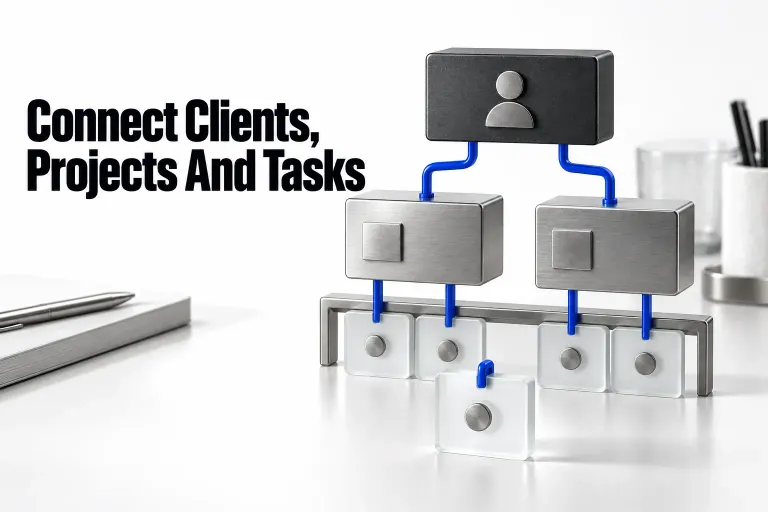
I recommend Notion for freelancers who need project notes and structured work in the same place. A client record can lead to a project brief, which leads to the next task. That is its strongest use. I would keep accounting and payment collection in their dedicated tools, and I would decide how clients will get access before choosing a template.
Start with a small internal workspace. Add client collaboration only once you’ve drawn a clear access boundary, because a filtered client view changes what’s displayed and doesn’t decide who can open a record.
Where Notion fits—and where I would choose another tool
| Your main requirement | My recommendation |
|---|---|
| Briefs, meeting notes, decisions and a modest project list | Notion is a strong fit: each database record is a page with room for working content. |
| A simple client/contact list with explicit follow-ups | Use Notion if you will maintain the records. A contact table does not, by itself, capture every email or sales activity. |
| Several clients collaborating in one database | Design the permission model first. A filtered client view is presentation, not an access rule. |
| Automatic invoicing, payment collection or tax reconciliation | Keep the authoritative financial records in a dedicated service. A Notion invoice tracker is an organizational layer. |
| A task appears a fixed time after the previous task is finished | Check that exact recurrence requirement before migrating. Repeating templates create pages on a calendar schedule. |
| A backup you can upload to restore the complete workspace | Do not choose Notion on that assumption: its export is not an instant workspace restore. |
A lean client-work structure
Here’s a fictional setup: a freelancer delivering a website redesign. The client is North Studio, the project is Website redesign, and the next task is Send the first layout for approval.
Store each kind of information in the appropriate record:
- Clients: contact details, relationship stage and the next follow-up date.
- Projects: client, delivery status, deadline and the brief inside the project page.
- Tasks: project, status, due date and a next action that starts with a verb.
A relation connects records between databases. Link each project to its client, then each task to its project. Add a rollup only when you need a value from the linked records, such as a client’s project count. You do not need a separate dashboard, finances database and elaborate progress formula to make the first project usable.
If that model suits your work, the client project tracker guide explains the structure in detail. For a simpler contact-and-follow-up system, start with the client CRM workflow.
Make the daily view answer one question
Your everyday view should answer “What needs my attention?” rather than display everything you have built. I would begin with a task table containing active tasks due today or overdue. Keep a second queue for active projects with no next action, and a third for work awaiting client approval.
Views use filters, sorts and groups to present the same database records. A board is useful for delivery stage; a calendar is useful for dates. Neither requires copying the tasks into another database. When a task seems to disappear, check the view’s rules before creating a replacement.
For the project-level “no next action” queue, add a Next action Text property to Projects using Notion’s property name-and-type controls. Combine your active project status with an empty Next action field. Update that note when the next task changes. It is a manual review prompt: a blank note does not prove that the project has no linked tasks, and a populated note does not prove that someone has scheduled the work.
To build the first daily queue, give the Tasks database a Due date property and agree which Status values mean active work. In an educational setup, Not started and In progress are active; Done is complete. Open the database settings and use Filter → Add advanced filter to combine AND and OR groups. Require an active status and a due date that is today or before today. The two date alternatives belong in one OR group inside the outer AND group; otherwise an overdue completed task could enter the queue.
Keep an active task with no deadline out of that due-date queue, then inspect it in a separate no-date view during the weekly review. An empty date is an unresolved planning decision, not evidence that the work is safely scheduled.

| Task | Status | Due date | In the due queue? |
|---|---|---|---|
| Send layout for approval | In progress | October 11 | Yes: active and overdue. |
| Send project update | Not started | October 13 | Yes: active and due today. |
| Prepare next brief | Not started | October 18 | No: future deadline. |
| Archive approved files | Done | October 11 | No: completed. |
| Choose the next milestone | Not started | Empty | No: inspect in the no-date queue. |
For a weekly review, decide who will act on each queue and what “waiting” means. A client approval needs an approver and a follow-up date. A task marked “In progress” still needs a concrete next action.
Choose a plan around a real limitation
As checked on 13 October 2026, the US pricing table lists Free at $0, Plus at $10 per member per month and Business at $20 per member per month with yearly billing selected. Yearly billing is an annual commitment; monthly billing and taxes can change the amount you pay. Confirm the billing cycle and final total at your workspace's checkout.
| Plan | Relevant boundary | When I would consider it |
|---|---|---|
| Free | Unlimited pages and blocks for an individual; limited collaborative blocks with two or more members. Ten external guests, 5 MB per uploaded file and seven days of page history. AI access is a limited trial. | Organizing your own work and sharing a small number of carefully scoped pages. |
| Plus | Unlimited collaborative blocks and external guests, larger uploads, 30-day page history and editable database automations. AI remains a trial. | A concrete Free-plan limit is getting in the way, or paid database automation is necessary. |
| Business | Includes Notion AI and granular database permissions, with 90-day page history. | You need its documented AI features or database page-level access, rather than just a more attractive dashboard. |
Guests and members are different roles. A client invited to selected pages does not need to become a workspace member merely to collaborate there. Check the invitation before sending it: workspace settings and guest limits can affect how someone is added. The guest-versus-member guide covers that decision.
Client access is a separate design problem
For a small engagement, I prefer a dedicated client page with only the material the client should receive. Keep internal estimates, other clients’ details and private notes outside it. Begin with Can view or Can comment; give editing rights only when the client needs to change content.
On that client page, open Share and review General access. Only people invited restricts general access to you and the invited people; that’s different from opening the page to the workspace or the web. Invite the intended client with Can comment if they need to review, or Can view if they only need to read. Guests need a Notion account. Check the role shown before you send the invitation, then inspect each linked deliverable’s own sharing boundary. Don’t add a link to the internal Clients database just to make the portal feel complete.

For a shared database, Business and Enterprise support page-level access rules based on person or created-by properties. Those rules apply across views. A client filter alone does not create that boundary, and a narrower rule cannot cancel broader access already granted elsewhere.
Before putting real client material in the shared area, inspect the client-facing page, individual record links, related pages and inherited access. Use the client portal permissions guide for the detailed checks. If you cannot explain why another client’s record is inaccessible, keep the database internal.
Recurring work: calendar schedule or completion schedule?
A weekly report and “follow up three days after the last call” are different requirements. Repeating database templates create new pages at scheduled intervals. They do not mean “wait until the previous task is completed.” Use them for predictable calendar work, and keep completion-based recurrence as a separate decision.
Automations have their own boundary: a recurring template does not trigger a database automation. If a scheduled task needs fixed properties or instructions, put those defaults in the template itself. Don’t design a chain that counts on a template-created page to start another automation. The recurring tasks guide compares the options.
Exports preserve information, not the whole working system
You can export pages and workspace content, but reuploading an export cannot instantly recreate the workspace. Export access also matters: pages the exporter cannot access are omitted. When exporting a database, Notion lets you choose its current or default view, rather than export all views at once.
Keep an inventory of the databases, essential relationships, formulas, shared pages and external files you depend on. Store exports somewhere you control. Before a migration, decide how you will rebuild the working structure and permissions; an archive containing familiar filenames is not evidence that the system can be restored.
What I would do first
Use one client, one project and a few fictional tasks to establish the structure. Make the next action visible, choose the access boundary and decide how recurring work should behave. Only then choose a starter from the Notion freelance template catalog. Favor a structure you can explain over an all-in-one bundle with databases you will never maintain.
For document-heavy freelance delivery, I’d pick Notion, because each project record has room for its brief and notes. For a team that mainly maintains client fields and follow-ups, compare Notion with Airtable before you build the workspace. If automatic financial operations, a specific recurrence engine or a complete round-trip restore is central to your work, let that requirement choose the tool.